
FlowStudio and FlowStudio MCP - Security and Architecture Review
Last updated: 2026-09-04
Audience: Enterprise InfoSec and Architecture review
Owner: Flow Studio Solutions, ABN 82 632 928 539
Executive summary
FlowStudio products connect to Microsoft Power Platform using Microsoft Entra authentication and delegated Microsoft API permissions. FlowStudio does not receive Microsoft passwords and does not store connector secrets.
There are five related product surfaces:
| Surface | Purpose | Primary data path | Storage model |
|---|---|---|---|
| FlowStudio App | Browser app for viewing, managing, and debugging Power Automate flows | User browser to Microsoft Power Platform APIs | Browser cache plus FlowStudio service metadata |
| FlowStudio for Teams | Team view for flow/app inventory, monitoring, and run history | Scheduled or user-initiated scans through FlowStudio server functions | Azure Storage tables/blobs, either FlowStudio-managed or customer-provided |
| FlowStudio MCP | MCP server for AI agents working with Power Automate | Agent to FlowStudio MCP to Microsoft Power Platform APIs | Mostly pass-through; stores account, usage, and tool-call logs |
| FlowStudio AI | Browser chat that operates Power Automate for the user, with the AI agent included | User browser to FlowStudio server to Azure OpenAI, then to Microsoft Power Platform APIs | Azure Storage tables; conversation content encrypted at rest |
| FlowStudio Governance | Tenant-wide governance, maker analytics, compliance scoring, and audit reporting | Scheduled or user-initiated scans through FlowStudio server functions | Azure Storage tables/blobs, either FlowStudio-managed or customer-provided |
Permissions required
Microsoft sign-in
FlowStudio uses Microsoft Entra ID for authentication.
| Permission | Why it is needed | Notes |
|---|---|---|
openid, profile, email | Sign the user in and identify the account | Used by the web app/auth layer |
| Tenant ID and object ID claims | Bind the account to the correct tenant/workspace | Used for tenant isolation and access checks |
offline_access | Maintain delegated access after explicit consent | User/admin can revoke consent in Microsoft |
Power Platform delegated permissions
These are requested only when the user grants Power Platform access.
| Scope | Used by | Purpose |
|---|---|---|
https://service.flow.microsoft.com//Flows.Read.All | App, Teams, MCP | Read Power Automate flow metadata and definitions where the user/service account has access |
https://service.flow.microsoft.com//Flows.Manage.All | App, Teams, MCP | Manage flows, including update, enable/disable, trigger, resubmit, or repair actions when invoked |
https://service.flow.microsoft.com//Activity.Read.All | App, Teams, MCP | Read flow activity/run metadata |
https://service.flow.microsoft.com//Approvals.Read.All | App/Teams where enabled | Read approval metadata |
https://service.flow.microsoft.com//Approvals.Manage.All | App/Teams where enabled | Manage approvals where the user has rights |
https://service.powerapps.com/User | App/Teams/MCP setup | Read Power Apps/Power Platform user context and app inventory where enabled |
https://api.powerplatform.com/.default | Newer Power Platform API paths | Read tenant/environment/flow endpoints exposed by the Power Platform API |
https://manage.office.com//ActivityFeed.Read | Governance audit features | Read Microsoft 365 activity feed events for governance reporting |
https://graph.microsoft.com/user.readbasic.all | Governance maker enrichment | Resolve basic user profile fields for maker/owner identification |
Permissions not requested for MCP
FlowStudio MCP does not request mailbox, calendar, OneDrive, SharePoint file, Teams chat, or broad Microsoft Graph content scopes for the agent request path.
Connecting without an admin approval: the FlowStudio browser extension
Some organisations do not grant the Power Platform delegated permissions above to new applications. Those tenants can connect a second way, using the FlowStudio browser extension, and the security properties differ in ways a reviewer should understand.
With the extension, FlowStudio holds no token source of its own. The user installs the extension in Chrome or Edge, pairs it once from the FlowStudio MCP dashboard, and keeps a signed-in Power Automate tab open. When an agent calls a tool, the request is executed inside that browser, using the session the user is already signed in to, and the result is returned to the agent.
What this means in practice:
- No administrator approval is required, because no new delegated permission is granted to FlowStudio. The extension acts only within a session the user has already established.
- The Power Automate access token never leaves the browser. FlowStudio does not receive it, and does not store it.
- The ceiling is still the user’s own access. The extension cannot reach anything the signed-in user could not reach themselves in the Power Automate portal, so it is not a way to bypass Power Platform permissions, data loss prevention policies, or environment restrictions.
- Activity is attributable to that user. Calls execute as the paired identity, and appear in Microsoft’s own audit trails as that user’s activity.
- The pairing is bound to one identity. A key that has been paired to one tenant and user cannot be reused by a different signed-in identity.
- Revocation is immediate and local. Removing the extension, signing out, or revoking the key from the FlowStudio MCP dashboard ends access.
Operational limits worth stating plainly: the one-time setup requires a desktop browser, calls only succeed while the paired browser is open and signed in, and each call carries additional latency compared with the delegated-permission path because it makes an extra hop through the browser. Organisations that can grant the delegated permissions should prefer that path.
Data accessed
| Data class | Examples | Scope |
|---|---|---|
| Account identity | Name, email, Entra tenant ID, Entra object ID | Current signed-in user and service accounts connected by the customer |
| Subscription and entitlement | Plan, call limit, billing period, Stripe customer/subscription IDs | FlowStudio account/workspace |
| Power Platform environment inventory | Environment IDs, names, region/type where available | Tenant/workspace, based on granted access |
| Power Automate flow metadata | Flow IDs, names, state, owner/team metadata, trigger/action structure, connector references | Flows visible to the delegated account or admin/service account |
| Power Automate run metadata | Run ID, status, start/end time, failed action names, error codes/messages | Monitored or requested flows |
| Action input/output payloads | Runtime inputs/outputs exposed by Power Automate action blob links | Read only when the user or agent explicitly asks to inspect a run action. MCP passes them through without storing or logging them. FlowStudio AI can quote them in an answer, and that answer is stored as conversation history - see Data stored |
| Connection inventory | Connector names, connection references, connection IDs, owner metadata where available | Used for diagnostics, governance, and flow repair |
| Maker metadata | Basic user display fields, ownership counts, governance role mapping | Governance reporting |
| Governance metadata | Business impact, owner team, support group, monitoring flag, tags, scores | Customer workspace |
Data not accessed or not stored
| Data | Position |
|---|---|
| Microsoft passwords | Never received by FlowStudio |
| Connector secrets | Not stored by FlowStudio |
| Mailbox/calendar/file contents | Not requested for MCP and not part of the standard Power Automate MCP scope set |
| Payment card data | Handled by Stripe; FlowStudio does not receive card number/CVV |
| Runtime action payloads | Not stored as routine product data; MCP can fetch them transiently when explicitly requested for debugging |
Data stored
FlowStudio App
| Stored item | Location | Purpose |
|---|---|---|
| Browser cache/preferences | Browser cache/OPFS | Faster UI, local filtering, recent selections |
| Account/license metadata | FlowStudio backend | Access control and entitlement checks |
| Optional cached flow/run data | Browser cache/OPFS | Local app performance and offline-style repeat viewing |
FlowStudio for Teams / Governance
| Stored item | Location | Purpose |
|---|---|---|
| Customer/workspace mapping | Azure Table Storage | Resolve the authenticated user to a workspace |
| Microsoft refresh tokens | Azure Storage token table, protected by Azure platform encryption at rest | Obtain delegated Power Platform access tokens after consent |
| Environments | Azure Table Storage | Inventory and filtering |
| Flows and Power Apps metadata | Azure Table Storage | Governance, search, reporting |
| Runs and failure metadata | Azure Table Storage | Monitoring, failure trends, diagnostics |
| Makers/users basic metadata | Azure Table Storage | Ownership and governance reporting |
| Connections/connectors | Azure Table Storage | Dependency and risk reporting |
| Governance fields | Azure Table Storage | Business impact, owner team, support and compliance views |
| CSV/report exports or debug blobs where configured | Azure Blob Storage | Customer reporting and support diagnostics |
FlowStudio MCP
| Stored item | Location | Purpose |
|---|---|---|
| Customer/workspace mapping | Azure Table Storage | Resolve the authenticated user to a workspace |
| Access keys and key metadata | Azure Table Storage | Authenticate MCP clients. Keys created when an agent connects through OAuth, and keys issued to the FlowStudio browser extension, are shown once and never stored - only a keyed hash (HMAC-SHA256 with a server-side secret), plus metadata such as key ID, owner reference, and revocation state. The standard API key generated from the dashboard is a signed token valid for 366 days; it is stored on the customer record so the dashboard can show it again, and can be removed from the dashboard |
| Microsoft refresh tokens | Azure Storage token table, protected by Azure platform encryption at rest | Obtain delegated Power Platform access tokens after consent |
| Entitlements | Azure Table Storage and Stripe | Plan limits and access control |
| MCP usage counts | Azure Table Storage | Billing/limits |
| MCP action logs | Azure Table Storage | Usage metering, security review, support diagnostics |
| Connector hints | Azure Table Storage | Improve agent guidance for connector/action authoring |
| Update-flow debug logs | Azure Blob Storage | Troubleshoot failed flow update/create calls |
MCP action logs record metadata such as tool name, timestamp, user ID, tenant ID, workspace, status, duration, and error message. They are not intended to store full flow definitions, connector secrets, or run payload bodies.
FlowStudio AI
| Stored item | Location | Purpose |
|---|---|---|
| Customer/workspace mapping | Azure Table Storage | Resolve the authenticated user to a workspace |
| Conversation history | Azure Table Storage, message content encrypted at rest, deleted after 90 days | Continue a conversation; support and quality review |
| Workspace preferences and cached access key | Azure Table Storage | Product settings and access to Power Automate |
| Entitlements | Azure Table Storage and Stripe | Plan limits and access control |
| Credit and token usage counts | Azure Table Storage | Billing/limits |
| Seat and persona assignments | Azure Table Storage | Access control within a workspace |
Conversation history is stored in Australia East, so conversation content at rest stays in Australia; only prompt content in transit reaches the Azure OpenAI resource in East US. The deployments are Global Standard, so Microsoft may process a request in any region where the model is hosted.
Unlike MCP action logs, conversation history stores message content: the user’s questions and the agent’s replies. Because the agent answers from live data, a reply can quote flow definitions, action inputs and outputs, and run errors it read in order to answer. Conversation content is not used to train any model. Review of conversation content by the FlowStudio team for product improvement is off unless the user turns it on; support and diagnostic access to a user’s own reported conversation is unaffected.
Data transferred
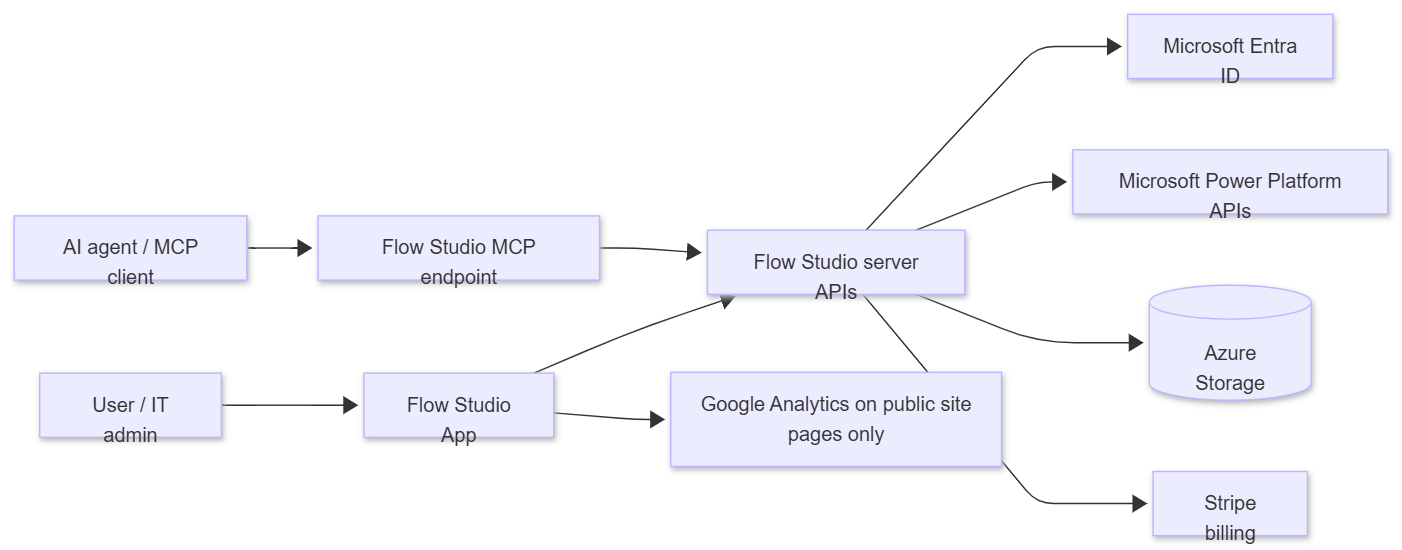
| Transfer | Data | Notes |
|---|---|---|
| Browser to Microsoft Entra | Login/authentication | Microsoft handles credentials |
| Browser/server/MCP to Power Platform APIs | Delegated API calls | Subject to Microsoft tenant policies, DLP, RBAC, and the consented account’s rights |
| Paired browser extension to Power Platform APIs | Calls executed in the user’s own signed-in session | Used only where the delegated permissions above are not granted. The Power Automate access token stays in the browser and is not sent to or stored by FlowStudio; the call result is returned to the requesting agent |
| ChatGPT or Claude (claude.ai) connector to FlowStudio MCP | A FlowStudio access key bound to the signed-in user | Issued after the user signs in with their Microsoft work account at FlowStudio. The AI client never receives a Microsoft token: FlowStudio holds the delegated access and the client calls FlowStudio with its own key, which the user can revoke from the dashboard |
| FlowStudio server to Azure Storage | Product metadata, logs, tokens, usage | Storage can be FlowStudio-managed or customer-provided for Teams/governance workspaces |
| FlowStudio AI server to Azure OpenAI | Prompt content | The user’s message, the conversation so far, and any flow definition or run output read to answer it. Sent to a FlowStudio-owned Azure OpenAI resource in East US; not used to train any model |
| FlowStudio site/server to Stripe | Billing/subscription metadata | Card data remains with Stripe |
| Public marketing/docs pages to Google Analytics | Page views and basic site events | Not used in MCP JSON-RPC agent traffic |
External systems and subprocessors
| System | Purpose | Data involved |
|---|---|---|
| Microsoft Azure | Hosting, functions, storage, monitoring - regions: Australia East (primary), West US, West Europe / Germany West Central | Service data, operational logs, stored metadata |
| Microsoft Entra ID | Authentication and delegated OAuth consent | Identity claims and OAuth tokens |
| Microsoft Power Platform APIs | Product data source and action target | Flow/app/environment/run/connector data |
| Azure OpenAI | Language models behind FlowStudio AI - FlowStudio-owned resource, region: East US. The deployments are Global Standard, so Microsoft may process a request in any region where the model is hosted; data at rest stays in East US | Prompt content, including flow definitions and run output read to answer a question. Microsoft does not use it to train models |
| Stripe | Subscription billing | Billing email, customer/subscription IDs, payment status |
| Google Analytics 4 | Public site analytics | Page/event analytics on public web pages only |
| HubSpot or email platform, if used | Product/support communications | Name and email for opted-in communications |
FlowStudio does not sell customer data.
Bring Your Own Azure Storage
Customers can use their own Azure Storage account for FlowStudio for Teams / Governance workspace data.
Setup model
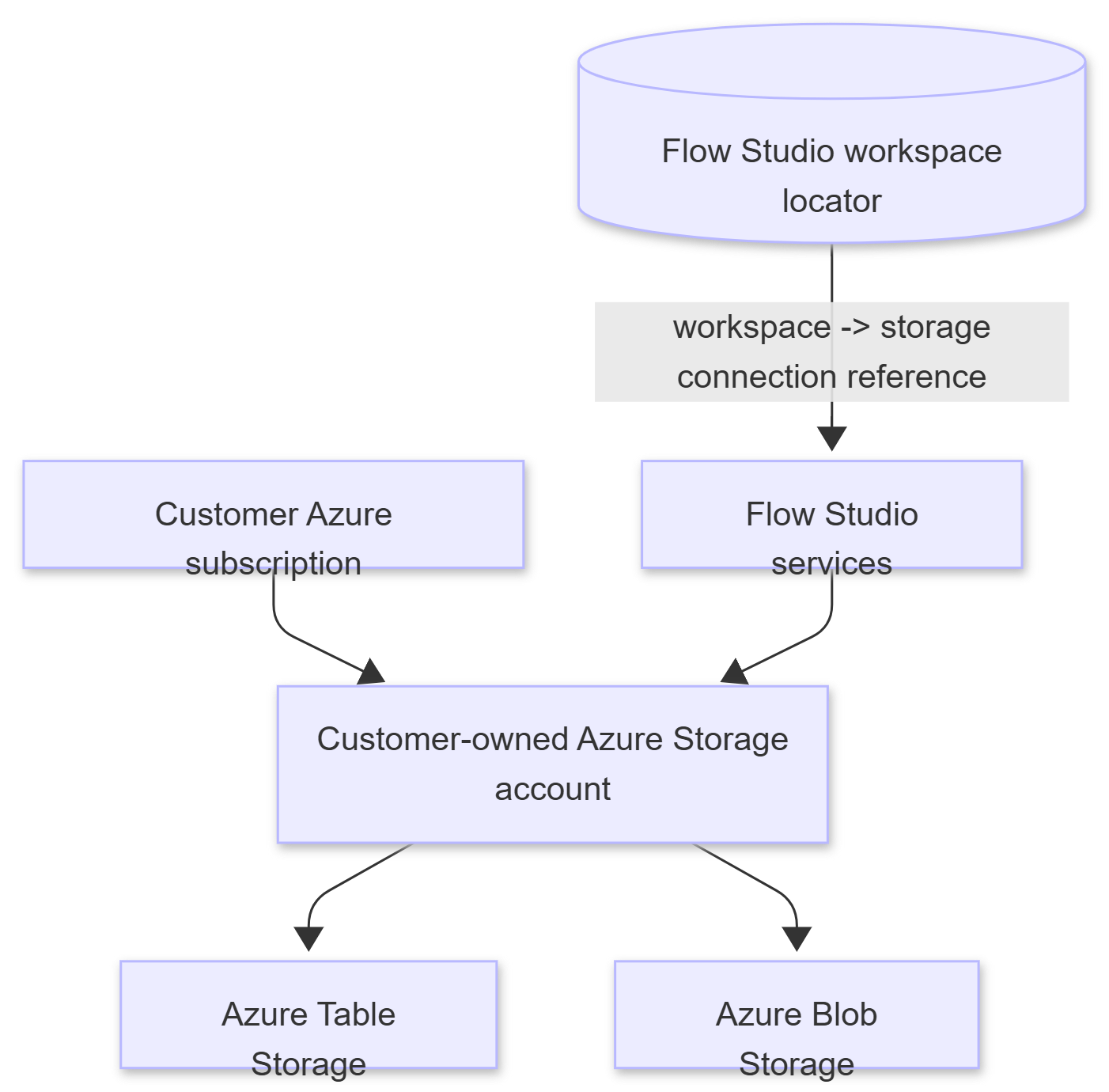
FlowStudio stores a workspace-to-storage mapping in its central registry. Product data for that workspace is written to the customer-owned storage account.
Customer requirements
| Requirement | Detail |
|---|---|
| Azure Storage account | General-purpose v2 storage account with Azure Table Storage and Blob Storage available |
| Network access | FlowStudio services must be able to reach Table and Blob endpoints. If private endpoints/firewalls are required, allow the FlowStudio function outbound path agreed during setup |
| Authentication method | Storage connection string or equivalent SAS/credential with required table/blob permissions |
| Permissions needed | Create/read/update/delete table entities; create/read/write blobs and containers used for exports/debug logs |
| Security baseline | HTTPS only, TLS 1.2+, encryption at rest enabled, customer-managed keys optional if required by the customer |
| Lifecycle | Customer owns storage account lifecycle, retention policies, backup/replication choices, and deletion controls |
Typical tables/containers
The exact set depends on enabled modules, but common tables include:
| Table/container | Purpose |
|---|---|
gEnvs | Power Platform environments |
gFlows | Power Automate flow metadata and governance fields |
gRuns | Flow run metadata and failure details |
gApps | Power Apps metadata |
gMakers | Maker/user summary metadata |
gConnections | Power Platform connection inventory |
gConnectors | Connector catalog/inventory |
gRules, gScans | Monitoring rules and scan state |
gAccounts / AccountTokens | Connected service account/token records where configured |
Blob containers such as clarity or debug containers | CSV exports and support/debug artifacts where enabled |
BYOS setup steps
- Customer creates or nominates the Azure Storage account.
- Customer confirms network controls and whether public endpoint, firewall allowlisting, or private endpoint access is required.
- Customer provides a least-privilege connection method to FlowStudio through the agreed secure channel.
- FlowStudio registers the workspace-to-storage mapping.
- FlowStudio runs a test scan and verifies tables/blobs are created and written.
- Customer validates storage account logs, data residency, backup, and retention settings.
FAQ
Does FlowStudio store Microsoft passwords?
No. Authentication is handled by Microsoft Entra ID.
Can customers use their own Azure Storage?
Yes. FlowStudio can write Teams/governance workspace data to customer-owned Azure Storage.
Does MCP store flow definitions?
Starter/Pro MCP calls are primarily pass-through. Flow definitions are not stored as routine MCP product data. Some paid monitoring/governance features can cache selected flow metadata when enabled.
Does MCP store run payloads?
No run payload storage. MCP can fetch action inputs/outputs transiently when the user/agent explicitly asks for run debugging.
Can FlowStudio modify flows?
Yes, where the consented account has rights and the user/agent invokes a management tool. Examples include update, enable/disable, trigger, cancel, resubmit, or add to solution.
What is a FlowStudio workspace?
A workspace is an isolation bucket within a tenant. One or more users in the same group share a workspace to review and manage monitoring together. Within the same tenant, multiple workspaces can exist - for example, different teams monitoring different projects independently. It is also possible to monitor multiple tenants (such as separate dev and prod tenants) within a single workspace. Multi-tenant workspace configuration is available by request.
Each workspace has an associated Azure Storage account for storing flow, run, and governance data. This storage can be auto-provisioned and managed by FlowStudio, or customers can bring their own Azure Storage account (BYOS).
Are calls tenant-isolated?
Yes. Records are partitioned by tenant/workspace identifiers, and API calls resolve the authenticated identity before accessing workspace data.
Can access be revoked?
Yes. Microsoft consent can be revoked from Microsoft, and FlowStudio API keys/tokens can be removed from the dashboard/service.
Are external AI models used by FlowStudio MCP?
No. FlowStudio MCP is an API/tool layer. The AI agent chosen by the customer calls MCP; FlowStudio does not run a server-side LLM for MCP requests. This answer covers MCP only - see the next question for FlowStudio AI.
Does FlowStudio AI run a language model?
Yes. FlowStudio AI is the one surface where FlowStudio operates the model rather than the customer. It runs on Azure OpenAI in a FlowStudio-owned Azure resource, and the FlowStudio agent decides which tools to call. Prompt content can include flow definitions and run output read to answer the question. It is not used to train any model.
Can FlowStudio AI change a flow on its own?
It reads freely. A write normally requires that the user asked for the change or accepted a proposal, checked per request before the call reaches Power Automate, and further checks reject specific classes of damaging change, such as a definition that would remove existing actions.
These checks are deliberately biased towards availability: if one cannot complete, the request is allowed to proceed rather than the product blocking legitimate work. They are a guard against an agent overstepping, not a security boundary. The boundary is Microsoft’s: every change is made with the user’s own delegated permissions, so FlowStudio AI cannot make a change the signed-in user could not make themselves, and the change is recorded against that user in Microsoft’s audit trail.
Does FlowStudio bypass Microsoft DLP or RBAC?
No. Calls are made through Microsoft APIs using delegated access and remain subject to the tenant’s Microsoft controls.
What happens if the subscription ends?
Access is removed. Stored data is deleted on request or during account/workspace offboarding according to the agreed process and applicable recordkeeping obligations.